· 6 min read
Affordable VST plugins: building a vocal setup without going broke
You don't need a $500 bundle to make a finished vocal. Here's how to build a plugin setup in layers: stock first, then free, then a few cheap tools that save you real time.
A lot of new producers think the sound they want is locked behind expensive plugin bundles. Most of the time, it isn't. It's in how you use a small set of tools. Here's how we'd build a setup on a tight budget.
Layer 1: what FL Studio already includes
Image-Line's edition comparison lists these effects as included in every FL Studio edition. That covers a complete vocal chain:
- EQ: Fruity Parametric EQ 2.
- Compression and limiting: Fruity Limiter.
- Filters: Fruity Love Philter.
- Delay and reverb: Fruity Delay 3 and Fruity Reeverb 2.
- Distortion and saturation: Fruity Soft Clipper, Fruity Fast Dist, Fruity Blood Overdrive, Fruity WaveShaper, Fruity Squeeze and Distructor.
Learn these first. Knowing one EQ and one compressor really well beats owning ten you don't understand.
Layer 2: free plugins that fill the gaps
- Klanghelm IVGI: free saturation and distortion (Windows and macOS).
- Softube Saturation Knob: free one-knob saturation through Softube Central (needs a Softube account and an iLok account, no dongle).
- Kilohearts Essentials: a free bundle with Bitcrush, Tape Stop, Trance Gate and more (free account).
- Valhalla Supermassive: a free reverb and delay for huge spaces.
- SUBMERGE: our free one-knob underwater vocal effect.
Layer 3: when a cheap paid plugin is worth it
Spend money when a plugin does something you do every session faster or better than your stock chain. For vocals, that usually means:
- Taming harsh S's quickly without hunting frequencies. That's what our UNDERGROUND DE-ESSER and its Smart Learn are for.
- Getting a finished space (reverb, delay, width) in one move instead of three plugins. That's APOLLO.
- A signature sound you can't easily build yourself, like the dark doubles and octave stacks in PHANTOM VOCALS.
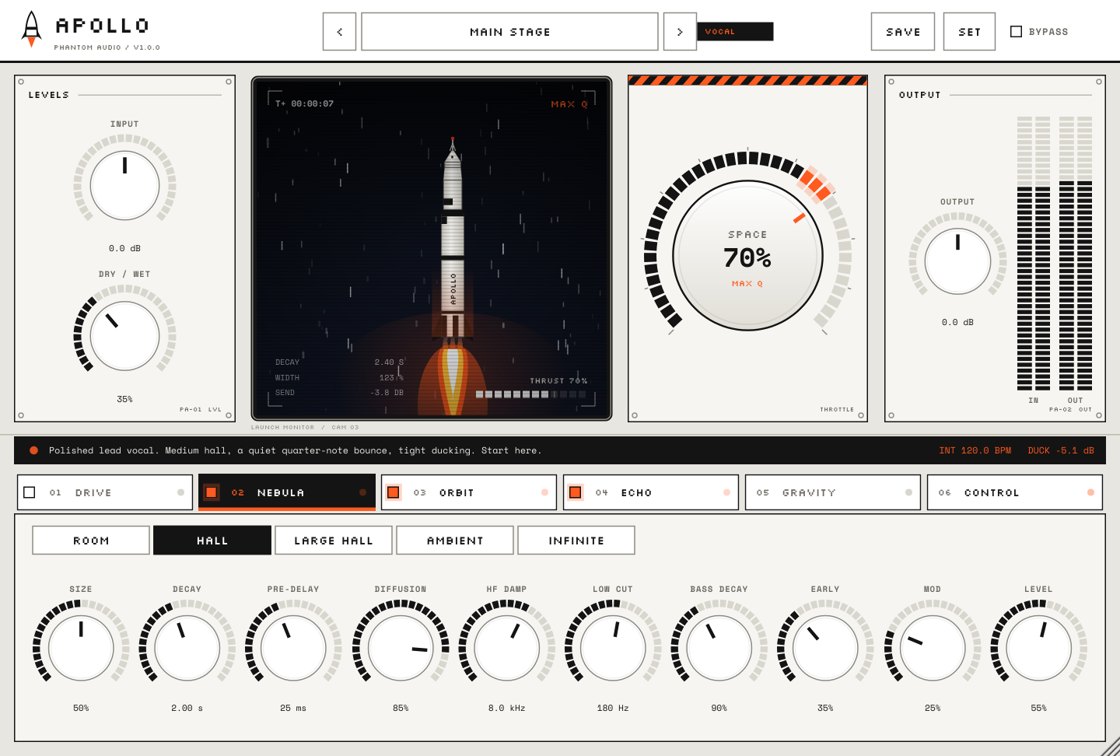 APOLLO$9.99
Space FX
Reverb, delay and width on one knob. Turn up SPACE and your vocal lifts off, from a tight room to a full stadium to infinite.
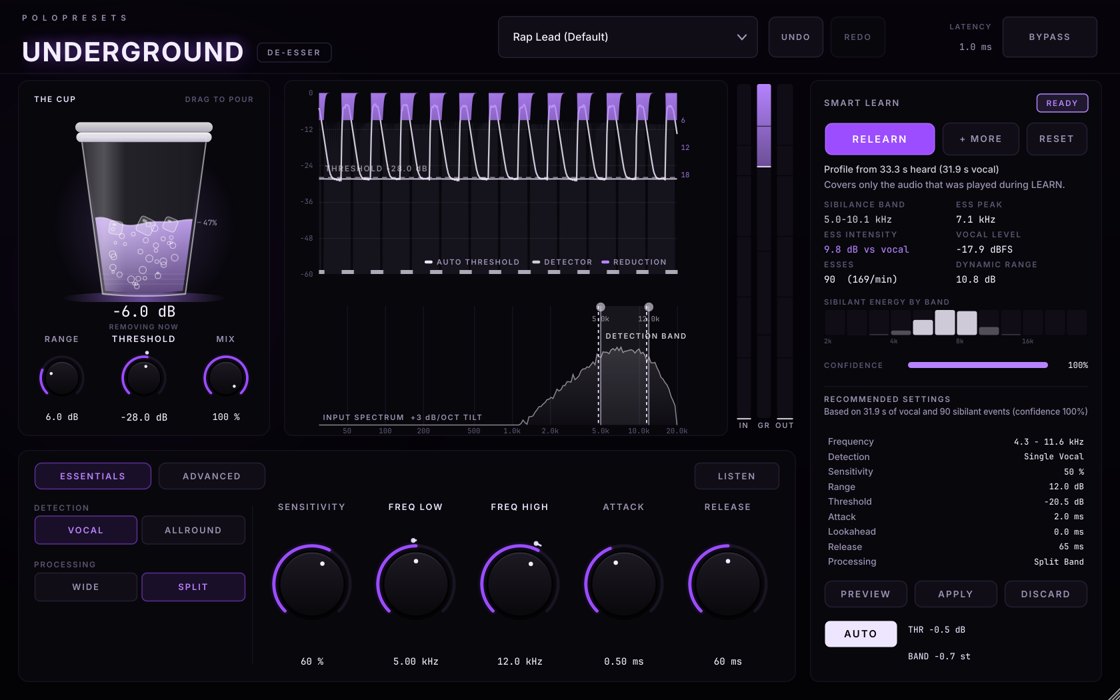 UNDERGROUND DE-ESSER$9.99
De-esser
The de-esser that learns your voice. Hit LEARN, rap a few bars and it finds your harsh S's and tames them, without killing the air in your vocal.
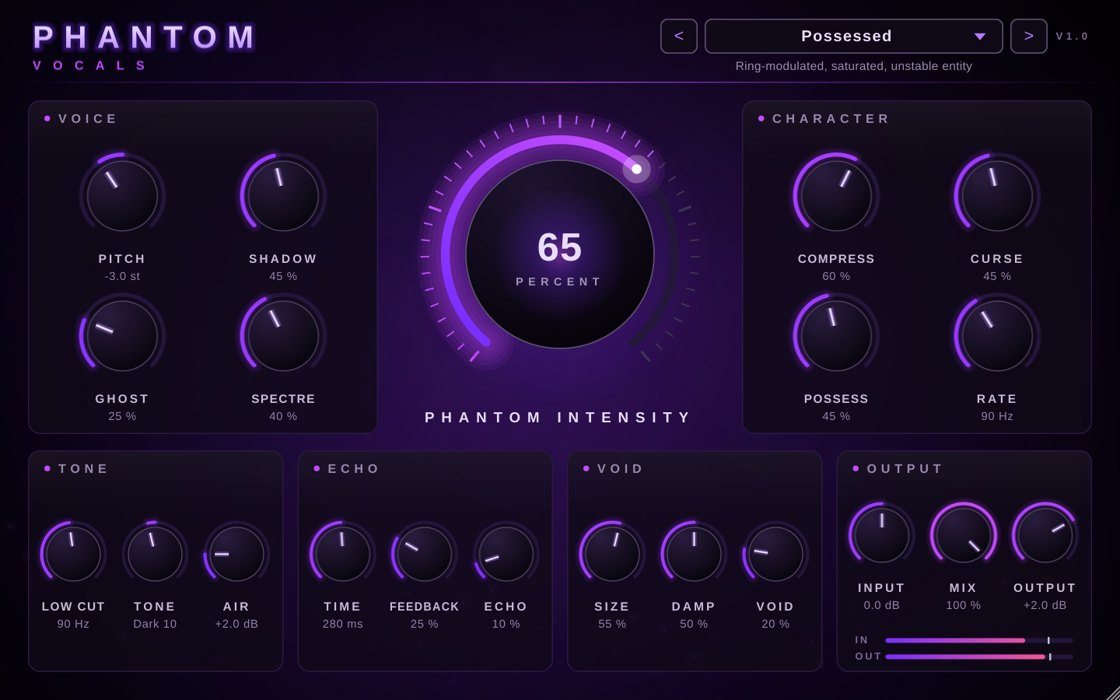 PHANTOM VOCALS$9.99
Vocal plugin
Your voice, haunted. Stack it, choir it and drown it in the void. One knob takes you from subtle to straight possessed.
Our plugins are priced so an independent artist can actually afford them: launch prices are $9.99 each, and there's no subscription.
Tips to avoid wasting money
- Listen to demos. Use before/after demos to hear the plugin on a real vocal before buying.
- Check compatibility. Make sure the format (VST3, AU, AAX) and the OS match your setup. Our plugins are VST3 for Windows 64-bit.
- Avoid subscription stacks you'll forget about.
- Don't buy during a mix. Finish the song with what you have, then decide what was actually missing.
- One plugin at a time. Learn it fully before adding the next.
A complete budget vocal chain
- Fruity Parametric EQ 2: high-pass and cleanup.
- De-esser: UNDERGROUND DE-ESSER.
- Fruity Limiter: compression.
- Saturation: IVGI or Saturation Knob, light.
- Space: Fruity Delay 3 and Reeverb 2, or APOLLO.
- Moments: SUBMERGE automated for intros and switches.
Save it as a mixer track state so it's one click next time. See FL Studio vocal presets for how.